Compression is one of the most searched topics in audio production. And vocal compression specifically sits at the top of that list, because it’s where most people run into trouble first. The problem isn’t the compressor. It’s that compression is a blunt instrument being asked to do a precise job.
Vocals are dynamic by nature. A singer moves closer to the mic on a quiet phrase, steps back on a big note, breathes between lines, drops to almost nothing on an intimate word. That movement is the performance. Apply compression clumsily, and you flatten all of that into something that technically fits in the mix but emotionally says nothing.
So let’s examine how to use compression on vocals to get the best possible sound. Even better, read to the end to see how we’ve made it even easier to control a vocal without killing it.
The Common Trap: Squashing First, Thinking Later
Most people starting out with vocal compression make the same mistake. They see the gain reduction meter moving and assume more reduction means better control. So they push the threshold down, crank the ratio, and wonder why their vocal sounds like it’s fighting to breathe.
What’s actually happening is that the compressor treats the entire vocal as a single problem to solve. Loud bits and quiet bits, body and breath, consonants and vowels. Everything gets hit with the same settings. The result is a vocal that’s more consistent in level but less convincing as a performance.
Here, we explain each section of a compressor.
Threshold: Finding the Right Entry Point
The threshold sets the level at which compression kicks in. Anything above it gets compressed. Anything below it passes through untouched.
Set the threshold too low, and you’re compressing everything, including the quiet, intimate moments that need to stay natural. Set it too high, and the compressor barely engages, leaving peaks uncontrolled.
For vocals, a good starting point is to set the threshold so you’re getting 3-6dB of gain reduction on the loudest phrases. Not on every word. On the peaks. Listen to the quieter sections. If compression is audible when the singer is barely singing into the mic, the threshold is too low.
The goal is to catch the peaks without touching the foundation.
Ratio: How Hard Is the Correction?
The ratio determines how aggressively the compressor responds when a signal crosses the threshold. A 2:1 ratio means for every 2dB over the threshold, only 1dB gets through. A 10:1 ratio is close to limiting.
For transparent vocal compression, most engineers work in the 2:1 to 4:1 range. That’s enough control without the compressor making itself obvious.
Higher ratios (6:1 and above) have their place on aggressive pop or hip-hop vocals where density is part of the aesthetic. But if you’re working on a performance where nuance matters, anything past 4:1 starts to erode the dynamics that make the vocal worth listening to.
Anyone new to compression often reaches for high ratios because they feel like they’re fixing more. They’re not. They’re just making the problem louder.
Attack: The Setting That Destroys More Vocals Than Any Other
Attack time determines how quickly the compressor responds after the signal crosses the threshold. This is where most vocal compression goes wrong.
A fast attack (1-5ms) means the compressor grabs the signal almost immediately. That catches transients, yes. But on vocals, the transient is often a consonant. A “T,” a “K,” a “P.” Those consonants are what give a vocal clarity and presence. Kill them with a fast attack, and the vocal turns soft and indistinct. It sits in the mix but doesn’t cut through it.
A slower attack (20-50ms on vocals) lets the initial transient pass through before the compressor engages, then the consonants survive. The compressor then clamps down on the body of the note. You get control without losing articulation.
Getting compressor settings right for vocals starts here. Slow the attack down. Let the front of the word breathe.
Release time matters too, but attack is where the damage usually happens first.
So What’s Actually Difficult Here?
Understanding these settings individually is straightforward enough. The problem is applying them to a real vocal performance where multiple things are happening simultaneously.
Body and breath aren’t the same signal. They don’t respond the same way to compression. The full, chest-forward sound of a belted note behaves completely differently to the airy, low-level texture of a breath between phrases.
A single compressor with a single set of parameters has to make a compromise between the two. Usually, that means the breaths either get over-compressed and sound pumped, or they get ignored, leaving the level inconsistent. Neither is ideal.
This is the ceiling that conventional compression hits. You can get very good at working within that ceiling. Experienced engineers do it every day with parallel compression, automation, and careful gain staging before compression even enters the signal chain. But it’s still a workaround. You’re compensating for a tool that wasn’t designed with vocal nuance as its primary concern.
How Dynamic Grading Approaches This Differently
Playfair Audio’s Dynamic Grading was built specifically around this problem. Instead of applying one set of compression parameters across the whole vocal, it separates what it’s working on.
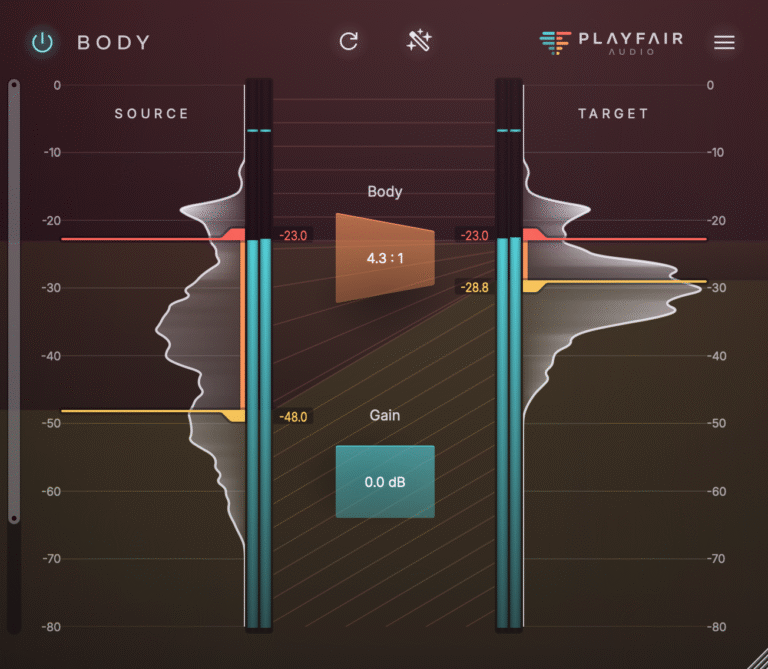
Body and breath are processed independently. The body of the vocal, the core weight and tone of the performance, gets shaped without the compressor making decisions based on breath noise or low-level room information. The breath gets handled on its own terms.
What that means in practice is that the things that make a vocal sound controlled and the things that make it sound human aren’t in conflict anymore. The compressor isn’t choosing between taming a peak and preserving a whisper. Those are now separate problems with separate solutions.
For anyone new to compression, this removes one of the most disorienting aspects of the process: fixing one thing often breaks another. Tame the loud phrase and the breaths pump. Open up the breaths and the peaks come back. With Dynamic Grading, that trade-off doesn’t apply in the same way.
For more experienced engineers, it opens up a different kind of control. Shaping the body of a vocal without the breath content muddying the compression behaviour gives you a cleaner read on what the compressor is actually doing. Decisions become more deliberate.
The free Body plugin that Playfair Audio also offers is worth starting with if you want to understand how this approach feels before committing to the full workflow. It gives you a hands-on reference point for what treating the body of a voice in isolation actually sounds like, which makes the logic behind Dynamic Grading much easier to hear clearly when you move to it.
Vocal compression doesn’t have to be a process of acceptable compromises. The right approach separates what needs to be controlled from what needs to stay alive. That’s the distinction Dynamic Grading is built around.