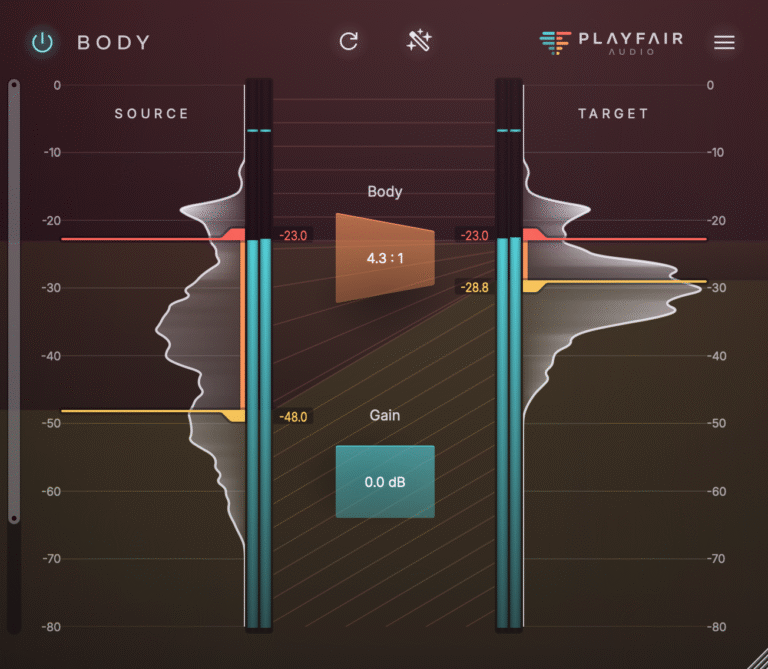
A common mixing frustration is drums losing their impact. They might sound great on their own, but once the rest of the track comes in, the punch disappears. Many people try adding more compression, more saturation, or just turning up the volume. Most of the time, these fixes do not help and can even make things worse.
This happens because impact, weight, and space are actually three different things. Mixing them up is where most people make mistakes with drum buses.
What “Hit” Actually Means
When a drum really hits hard, three things are happening at the same time.
The transient is the first hit – the crack of a snare, the thump of a kick, or the snap of a rimshot. It happens in just milliseconds and is what makes listeners feel the physical impact. This is what gives the punch.
After the transient, you hear the sustained tone. This is the body of the kick, the ring of the snare, and the weight that makes each hit feel solid.
Underneath both of those is the floor. This includes the room sound, decay, and the air around the kit – the space between hits. If you manage the floor well, the drums have a three-dimensional presence. If not, it can build up and make everything sound washy and unclear.
All three contribute to the perception of a drum hitting hard. The problem is that most dynamics tools process all three simultaneously, which means every adjustment to one affects the others.
Where Most Engineers Go Wrong
A common mistake is setting the attack too fast on a bus compressor. When the attack is too quick, it catches the transient before it can reach the mix. The compressor is working as designed, but the result is a drum bus that feels controlled and lifeless instead of tight and aggressive. The energy that gives drums their impact gets reduced before it can do its job.
Another mistake is over-compressing the body. Too much gain reduction on the sustained part of each hit takes away the weight that makes drums feel real. You might get a drum bus that is loud but lacks substance. It sits in the mix without really filling any space.
The third mistake is ignoring the floor. Room mics and overhead bleed can build up in a busy track, and if you do not manage the floor, the kit can start to sound like it is in a cloud instead of a room. Clarity fades, and hits lose their definition because the decay from the last hit has not cleared before the next one.
For a broader look at how compression creates these kinds of problems, How Compression Ruins Mixes covers the most common causes and what to listen for.
Techniques That Help
One quick fix for a drum bus is to slow down the compressor’s attack. Setting it between 20 and 50 milliseconds lets the transient come through before the compressor kicks in. This way, the peaks hit the mix, the compressor shapes the body, and the result feels more like real drums and less like a managed signal.
Setting levels before the compressor hits the bus makes its job much easier. If your tracks are already pretty even, the bus compressor only has to handle small changes. This leads to less gain reduction, keeps the transients intact, and gives a more natural sound.
Parallel compression is also a good option for drum buses, just like it is for other complex sounds. By blending a heavily compressed version of the bus under the original, you add weight and consistency without squashing the peaks of the dry signal. The original track keeps the impact, while the compressed version fills out the body. For more details, see Parallel Compression: What It Solves and Where It Fails.
Transient designers can help add punch to individual drum sounds, but they have limits when used on a full drum bus. Since they process every hit the same way, softer notes can end up too loud and harder hits can lose their natural feel. For more on this, check out Why Transient Designers Fall Short in a Real Mix.
Using a high-pass filter on room mics can really tighten up the floor. Low-frequency buildup in the room is often what makes a kit sound washy instead of open. Cutting everything below 100 to 150Hz on the room channels clears space for the kick and lets the kit breathe, while still keeping the live feel.
Where Conventional Compressors Fall Short
Even with solid technique, there is a limit to what traditional compression can do on a drum bus before you start to lose something.
The main issue is that a compressor uses just one threshold. It cannot tell the difference between the transient, the body, and the floor. So if you try to tighten the body, you might also catch the transient. If you try to control the floor, you end up affecting the body. There is no setting that treats punch, body, and floor as separate things, because to a compressor, they are all part of the same signal.
This means you have to make trade-offs. If you protect the transients, the body might feel loose. If you tighten the body, you lose some impact. You can get good at working within these limits, but they’re still there. For more on this, see The Anatomy of Audio Dynamics.
How Dynamic Grading Handles It
Dynamic Grading uses intensity regions rather than a single threshold. It treats punch, body, and floor as separate controls, which changes what you can do with drum bus processing.
In practice, this means you can boost the impact of a drum bus without raising everything that comes after the transient. You can shape the punch on its own, so hits feel stronger but not harsh. The body can be tightened without affecting the transient or the floor. You can also manage room and decay directly, so the kit stays open and clear without losing its sense of space.
If your drum bus is pumping, it is usually because the body is being compressed too much compared to the floor. If a kick lacks low-end definition, the body is probably getting squeezed along with the peaks. In a dense mix where the kit disappears, the floor is often the problem. Dynamic Grading lets you fix each of these issues directly, rather than just adjusting a single threshold and hoping for the best.
A 14-day free trial is available at playfair-audio.com. No hardware dongle required.
Image by jacqueline macou from Pixabay