When you open a typical mix template, you’ll probably see a different dynamics tool for each job. There’s a transient designer for drums, an opto-style compressor for vocals, a glue compressor on the bus, and something more forensic for mastering. Each tool handles a specific problem well, but what if one tool could do the job of all of them?
Dynamic Grading was designed to change how we think about dynamics. Instead of switching tools for each task, you use one plugin and just adjust how you apply it. With a conventional dynamics plugin, this might be a compromise; with Dynamic Grading, it’s not, and once you grasp the concept, you’ll wonder why you’re not already joining the growing number of engineers and mixers using it.
How Dynamic Grading Is Different
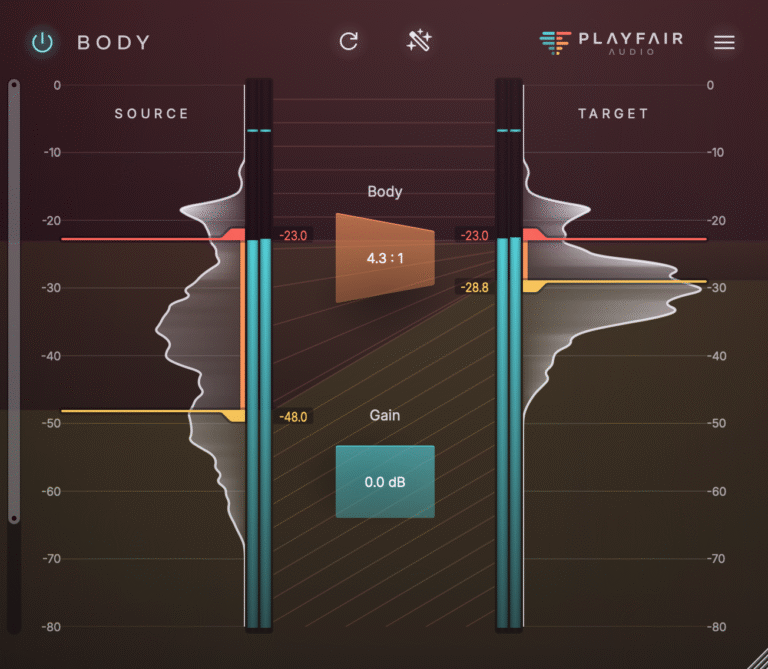
Dynamic Grading works for so many different tasks because of how it processes sound. Instead of using one threshold and ratio for the whole signal, it splits the dynamic range into three parts: punch (the peaks), body (the main part of the sound), and floor (the quiet details and tail). You can compress or expand each part separately.
That’s the main idea.
A drum bus and a mastering chain aren’t completely different problems that need separate tools; they just need different balances of the same three regions. Drums often need more punch. Vocals are mostly about body. Glue work is about how body and floor interact. When you can control each region on its own, you don’t have to grab a new tool for every job. Instead, you just decide what to focus on.
Common Dynamics Applications
Drum bus: Punch and transient energy make the difference between a drum bus that stands out and one that gets lost in the mix. If you expand the punch but leave the body alone, the hits stay strong without making the whole bus too hard or loud. For more details, check out How to Make Drums Hit Harder in a Mix.
Vocals: Most vocal issues are in the body, which is the main part of the performance, not the transients. If you compress the body but leave the punch alone, you control the level without losing the consonants and breath details that keep the take lively. For a full guide, see How to Compress Vocals Without Killing the Performance.
Mix bus: Glue is about closing the gap between body and floor so the mix feels unified, but not squashed. Gentle compression on all three regions, with more focus on body and floor, helps the mix come together while the punch keeps its original energy. For the details, check out How to Glue a Mix Without Over-Compressing It.
Mastering: The same three-region approach works for stereo masters; in fact, it is especially useful in mastering, where you usually can’t go back and change the mix. Being able to shape the floor and body separately, instead of relying on a single-threshold compressor, lets you fix specific issues in a mix you can’t always redo.
One Plugin For Many Tasks
You don’t need to learn a new tool for every stage of your project. The dynamic histogram, the punch, body, and floor regions, and Source Learn’s automatic threshold detection all work the same way, whether you’re working on a kick drum or a two-bus master. The only thing that changes is what you want from the signal; maybe more attack, more density, or a tighter floor. The floor section is also a killer tool for drying up audio with too much reverb; in fact, some pros say it’s the simplest way to do it.
Composer and producer Gert Keunen, who has used Dynamic Grading across multichannel work, put it simply: “The visual approach makes this plugin very intuitive. It can work extremely well on multichannel busses.” Reviewing Dynamic Grading 2 for Production Expert, Luke Goddard was clear about the approach: “If you don’t fancy stringing tonnes of plugins together to get what you want, or you’re ready to go into uncharted dynamic territory for that standout sound, Dynamic Grading 2 has you completely covered.”
That sums up why Dynamic Grading is so versatile: you need fewer tools, just one model, and you can use it wherever your mix needs it.
Try It Across A Session
The best way to see how flexible one dynamics model can be is to use it at different stages in the same project. Try it on a drum bus, then a lead vocal, and then the mix bus. You’ll notice that much of what you’ve learned applies each time.
Download the free 14-day trial and try it on your next mix, from tracking through mastering.
Image Credit: Brett Sayles – Pexels